How to Become a WordPress Developer in 2026: A Beginner’s Guide
WordPress powers more than 43% of websites across the internet, making it the most widely used content management system in the world. From personal blogs and small business websites to large-scale media platforms and online stores, WordPress continues to be the preferred choice for website owners.
Stay connected
Add us as a trusted source on Google
Get our latest guides, updates, and helpful resources surfaced more often when you search and browse.
Due to its widespread adoption, the demand for skilled WordPress developers who can create custom solutions, optimize performance, and build scalable websites remains stronger than ever.
If you’re interested in starting a career in web development but feel intimidated by complex programming frameworks, WordPress development offers a practical and beginner-friendly path into the industry.
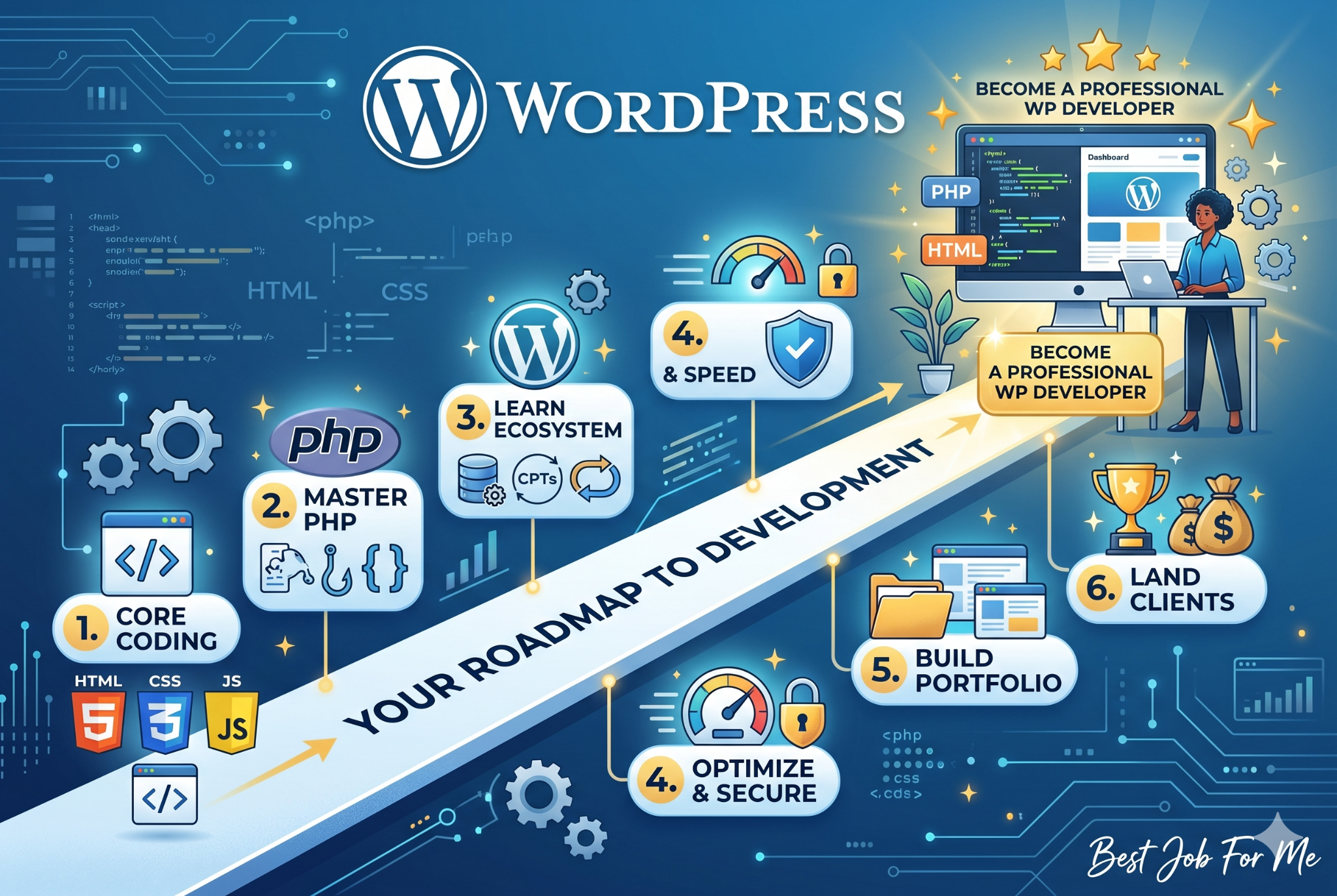
This comprehensive 2026 roadmap will guide you through the skills, tools, and strategies needed to become a professional WordPress developer from the ground up.
1. Understanding the Role of a WordPress Developer
Before you begin learning code, it’s important to understand what a WordPress developer actually does. The profession typically falls into three primary areas of specialization.
Frontend (Theme) Developer
Frontend developers focus on the visual side of a website. Their responsibility is to ensure that websites look appealing, function smoothly across devices, and provide a great user experience. They primarily work with HTML, CSS, JavaScript, and modern layout techniques such as Flexbox and CSS Grid.
Backend (Plugin) Developer
Backend developers handle the functionality that powers a website behind the scenes. Their work involves creating custom features, integrating external services, processing data, managing user interactions, and maintaining security. This role is ideal for those who enjoy solving technical challenges and working with application logic.
Full-Stack WordPress Developer
Full-stack developers combine frontend and backend expertise. They can transform a design mockup into a custom WordPress theme while also developing plugins and advanced functionality to support business requirements. Because of their broad skill set, full-stack developers often have access to higher-paying freelance projects and remote opportunities.
2. Building the Core Technical Skills
To distinguish yourself from users who simply install themes and plugins, you need a strong understanding of the technologies that power WordPress websites.
HTML5 and CSS3
HTML provides the structure of a webpage, while CSS controls its appearance. A strong grasp of semantic HTML helps improve accessibility and search engine visibility. On the CSS side, learning modern techniques such as CSS Variables, Flexbox, and Grid Layout is essential for building responsive and professional-looking websites.
JavaScript
JavaScript powers interactivity across modern websites and plays an increasingly important role within WordPress, particularly with the Gutenberg editor.
Developers should become comfortable with:
- DOM manipulation
- Event handling
- AJAX requests
- Fetch API
- Dynamic content updates
These skills enable you to create interactive features such as search filters, popups, sliders, and real-time content updates.
PHP
Since WordPress is built on PHP, understanding the language is essential for any developer.
Focus on learning:
- Variables and data types
- Arrays and loops
- Conditional statements
- Functions
- WordPress Actions and Filters
- Object-Oriented Programming concepts
A solid understanding of PHP allows you to create custom functionality instead of relying solely on third-party plugins.
MySQL and Databases
WordPress stores content, settings, and user information inside a MySQL database.
Learning how WordPress organizes data, understanding key tables such as wp_posts and wp_options, and becoming familiar with basic SQL queries will make troubleshooting and optimization significantly easier.
3. Creating a Professional Development Environment
Professional developers never experiment directly on live websites. Instead, they work within dedicated development environments where changes can be tested safely.
Local Development Setup
Installing a local development environment should be one of your first steps.
Tools such as LocalWP simplify the process by creating a complete local server environment that includes PHP, MySQL, and a web server. This allows you to build and test projects without purchasing hosting or risking issues on a production website.
Code Editors and Version Control
Replace basic text editors with a professional development environment such as Visual Studio Code.
Helpful additions include:
- PHP linting extensions
- Code formatting tools
- Git integration
- WordPress development extensions
You should also learn Git and GitHub to manage version control. These tools allow you to track changes, collaborate with others, and restore previous versions of your code whenever necessary.
4. Learning the WordPress Ecosystem
After mastering the fundamentals, the next step is understanding how WordPress itself operates.
Template Hierarchy
WordPress uses a template hierarchy system to determine which files should display different types of content.
Understanding how files such as page.php, single.php, archive.php, and category.php interact gives you greater control over site structure and customization.
Themes and Plugins
Child Themes
Directly modifying a parent theme is never recommended because updates will overwrite your changes.
Learning how to create and use child themes ensures your customizations remain intact after updates.
The Loop
The Loop is WordPress’s core method for retrieving and displaying content from the database.
Understanding how it works is essential for theme development and content customization.
Custom Post Types
Not every website is built around blog posts.
For example:
- Real estate websites use property listings.
- Job boards use job listings.
- Directories use business listings.
Custom Post Types allow developers to create specialized content structures tailored to specific business needs.
Performance and Security
Professional developers build websites that remain fast, secure, and reliable.
Important areas to understand include:
- Database optimization
- Caching systems
- Image optimization
- Browser caching
- Secure coding practices
- Input sanitization
- Output escaping
These techniques help improve performance while protecting websites from common vulnerabilities.
5. Building a Strong Portfolio
Potential clients and employers are far more interested in practical experience than formal qualifications.
Before seeking paid work, create several projects that demonstrate your abilities.
Small Business Website
Build a custom WordPress website for a local business and focus on speed, responsiveness, and usability.
WooCommerce Store
Create an eCommerce website with product variations, checkout customization, and optimized performance.
Custom Plugin Project
Develop a simple plugin that solves a specific problem or adds useful functionality to WordPress.
For every project, document your process and explain the technical decisions you made along the way.
6. Getting Your First Clients
Once you’ve built a portfolio, it’s time to start generating income from your skills.
Upwork and Fiverr
Begin with smaller projects such as:
- Fixing CSS issues
- Improving website speed
- Resolving WordPress errors
- Troubleshooting plugin conflicts
These jobs help you build reviews and gain practical experience.
Agency Partnerships
Many marketing and SEO agencies outsource WordPress development work.
Contact local agencies, share your portfolio, and offer white-label development services to create a steady stream of projects.
Helping Local Businesses
Look for businesses with outdated or slow websites and provide actionable recommendations.
Instead of sending generic sales messages, identify specific problems and propose a clear solution that improves performance, user experience, and conversions.
Final Thoughts
Becoming a WordPress developer requires consistent learning and hands-on practice, but the path is straightforward and achievable. By focusing on HTML, CSS, JavaScript, PHP, WordPress architecture, and database fundamentals, you can build skills that are in demand across freelance, agency, and remote work opportunities.
Start by creating a local development environment, build projects regularly, document your work, and continue refining your technical abilities. Over time, your portfolio and experience will become your strongest assets for attracting clients and advancing your career.